If you’re new to selling on Amazon, you’ve probably seen the term ASIN somewhere on product pages or inside listing tools. At first glance, it can feel confusing and technical. But in reality, ASIN is one of the simplest - and most important - concepts every Amazon seller needs to understand.
We’ll break down what is ASIN, why it matters, and how sellers can use it effectively. Everything is explained in clear, simple language, especially for beginners.
What Is ASIN?
ASIN stands for Amazon Standard Identification Number. It’s a unique 10-character code that Amazon gives to every product in its catalog. You can think of it as Amazon’s internal product ID, used to organize, track, and display millions of items on the platform.
Each ASIN is made up of letters and numbers. Most ASINs start with “B0”, while books usually use a numeric code (often the ISBN). For example, an ASIN might look like B07FZ8S74R or 0451524934.
🔔Pro Tip:
Want your products to stand out on Amazon? Check this article: What Is the Amazon Buy Box? Tips to Win It
Where to Find ASIN Numbers?
Finding an ASIN on Amazon is simple. Here are the most common ways beginners use:
- Check the product URL: Open a product page on Amazon and look at the web address. The ASIN usually appears right after “/dp/” in the URL.
- Look in the product details section: Scroll down the listing page to the Product Information or Details area. The ASIN is often listed alongside other technical details.
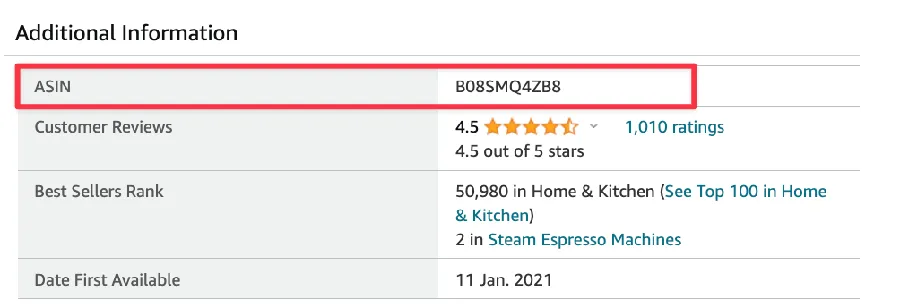
- Use Seller Central (for sellers): If you have a seller account, navigate to Manage All Inventory in Seller Central. You can find the ASIN for each product directly in your inventory list.
Get an ASIN for a New Product
How you get it depends on whether the product already exists on Amazon or not.
🚩The product is already on Amazon
You must use the existing ASIN when listing your offer. Creating a duplicate ASIN for the same product can lead to listing errors or account penalties.
🚩The product is brand new to Amazon
You’ll need to create a new product listing. During this process, Amazon will require a product identifier such as a UPC, EAN, or GTIN (usually provided by the manufacturer or GS1). Once submitted, Amazon will automatically generate a new ASIN for your product.
Why Is the ASIN Number Important for Sellers?

Every product listed on Amazon (except books, which use ISBNs) must have an ASIN. This code helps Amazon:
- Identify a specific item & let Amazon know what you're selling
- Show the right product to the right shoppers
- Improve your product's visibility in search results & category pages
- Make listing products easier & cleaner
- Manage inventory, catalog, & order (include FBA)
- Protect your seller account
How to Use ASIN Numbers?
For sellers, using ASINs the right way can make a real difference in how smoothly your business runs.
🔆Market research: ASINs help you study the market more accurately. You can track specific products, compare prices, and spot trends without confusion.
🔆Listing optimization: When you match your product to the correct ASIN, it appears on the right product detail page. This improves visibility, avoids listing errors, and helps customers find exactly what they’re looking for.
🔆Inventory management: ASINs make it easy to track stock levels, sales performance, and reorder needs. This reduces the risk of running out of stock or holding too much inventory.
🔆Marketing and advertising: You can include in ads and promotions and reach more relevant shoppers.
Tips to Manage ASIN Effectively
Managing your ASINs properly helps keep your Amazon store organized, compliant, and competitive. Here are some simple best practices every seller should follow.
1️⃣ Keep your ASINs organized
Create a spreadsheet or tracking file for all your ASINs. Group similar products together so you can quickly review your catalog, monitor performance, and spot issues early.
2️⃣ Monitor ASIN performance regularly
Check sales, traffic, and conversion data for each ASIN. Regular monitoring helps you understand which products are growing, which are slowing down, and where improvements are needed.
3️⃣ Keep product details accurate & updated
Products change over time. So make sure titles, descriptions, images, and specifications stay accurate. Updated listings improve customer trust and reduce returns.
4️⃣ Optimize listings for visibility
Use relevant keywords, clear images, and well-written descriptions. Small listing improvements can significantly boost an ASIN’s visibility and sales performance.
5️⃣ Stay compliant with Amazon policies
Follow Amazon’s product and listing guidelines closely. Keeping your ASINs compliant helps protect your account health and prevents unnecessary suspensions or listing removals.
Expert Tip: Sell Effectively on Amazon with DodgePrint
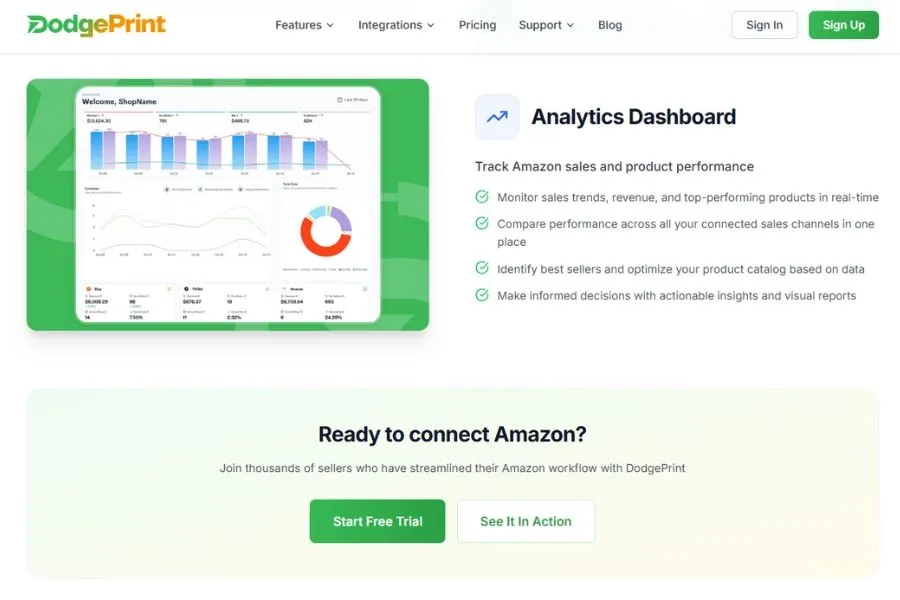
If you’re managing multiple ASINs or selling across more than one platform, DodgePrint can make your Amazon workflow much simpler.
Instead of juggling spreadsheets, tools, and dashboards, DodgePrint brings everything into one place so you can focus on growing your POD business.
One of its biggest strengths is analytics. DodgePrint helps you track product performance, sales trends, and profits across Amazon and other channels, making it easier to see which products are doing well and which ones need improvement.
Beyond analytics, DodgePrint also offers:
- Smart Catalog to organize designs and products in one clean library
- Bulk & Scheduled Listings to publish products faster on Amazon, Etsy, Shopify, and TikTok Shop
- Centralized Order Management to handle & fulfill all orders from one dashboard
- AI Optimization to improve listings and overall strategy
☘️ Success Story: Scaling from 50 to 5,000 Orders a Month with DodgePrint
FAQs About What Is ASIN
ASIN vs SKU - What Is The Difference?
ASIN and SKU are both product identifiers, but they serve different purposes.
An ASIN (Amazon Standard Identification Number) is created by Amazon. It’s used across the entire Amazon marketplace to identify a specific product. If multiple sellers sell the same item, they usually share the same ASIN.
A SKU (Stock Keeping Unit) is created by the sellers. It’s for internal use only and helps you track inventory, pricing, and fulfillment inside your own business. Each seller can have different SKUs for the same ASIN.
How Can I Protect My ASIN?
If you own a brand, the best way to protect your ASIN is to enroll in Amazon Brand Registry. This free program gives you tools to control your listings and protect your intellectual property.
How Many ASIN Numbers Can I Have?
There is no fixed limit to how many ASINs you can have as long as each ASIN represents a unique product.
However, Amazon limits how many new ASINs you can create per week if you’re a new seller. Once you build a sales history and maintain good account health, these limits are usually increased.
What Is an ASIN Number?
An ASIN number is the same thing as an ASIN: Amazon's 10-character Standard Identification Number assigned to each product. Some sellers call it an "ASIN number" or "ASIN code," but officially it is just the ASIN.
ASIN vs ISBN vs UPC: What Is the Difference?
All three are product identifiers, but they come from different sources. ASIN is created and owned by Amazon and only works inside Amazon. ISBN is an international standard for books, assigned by ISBN agencies. UPC (Universal Product Code) is the 12-digit barcode you see on physical retail products, issued by GS1. When listing a brand new product on Amazon, you typically supply a UPC or EAN and Amazon then generates an ASIN for it. For books, the ISBN often becomes the ASIN.
Is ASIN a Serial Number?
No. A serial number tracks a single physical unit (one phone, one TV), while an ASIN tracks a product type across every unit sold on Amazon. Two buyers of the same shirt will see one ASIN but receive shirts with different serial numbers.
Final Words
If you are selling on Amazon, understanding What is ASIN is a must. When you use ASINs correctly, you reduce listing errors, stay compliant with Amazon’s rules, and build a stronger foundation for long-term growth.