DodgePrint Etsy Insight has just introduced Trending 24H, Competition Tracker, and design extraction and mockup creation features on the Extension. These three updates help sellers view sales data from the past 24 hours, save competitors to track, and continue preparing listings while working directly on Etsy.
The update focuses on familiar peak-season tasks: finding products worth researching, tracking shops in the same segment, and putting ideas into action. Below is a detailed look at each feature and how to incorporate them into your research workflow.
Trending 24H: View keywords and products with high sales
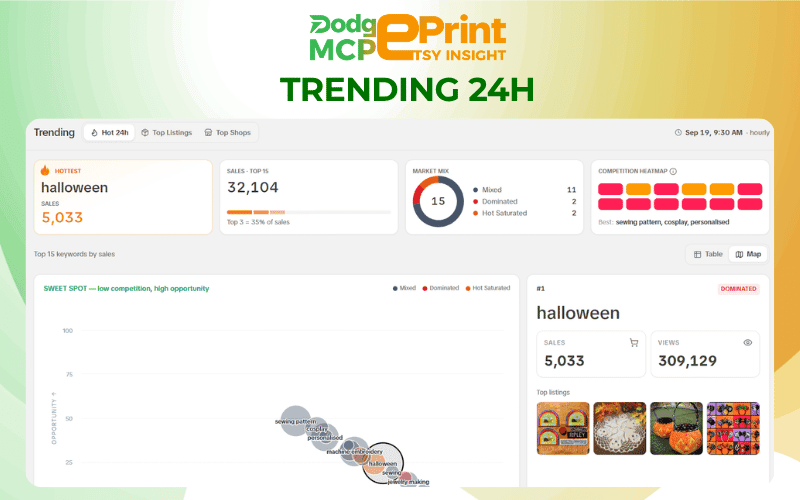
Trending 24H aggregates keywords and products by sales over the past 24 hours, alongside competition levels and opportunity scores. The interface displays data updated hourly, helping sellers monitor the latest sales signals to decide what to research.
Track the Top 15 keywords by sales
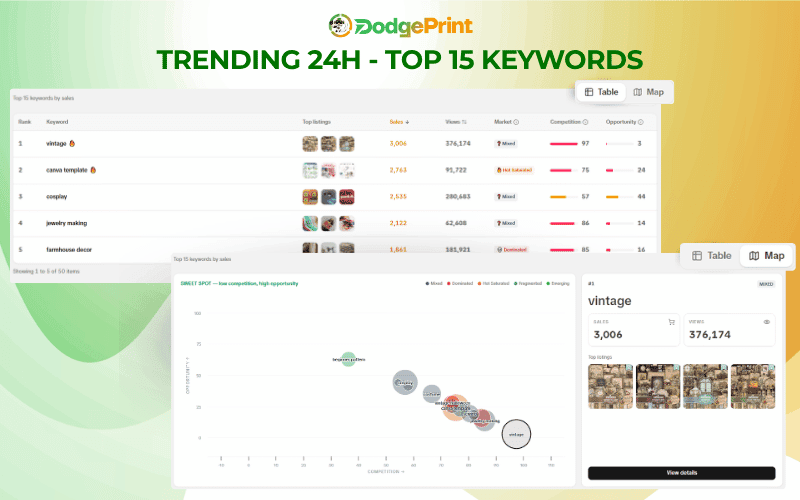
The dashboard displays the Top 15 keywords by sales, the leading keyword, the group's total sales, and the share of sales held by the Top 3. Sellers can see which keywords stand out and how concentrated sales are within the displayed group.
When you select a keyword, the detailed view provides sales, views, market status, and related listings. You can then continue researching specific products associated with the keyword you are interested in.
Compare competition levels and opportunity scores
The Competition & Opportunity map plots competition levels and opportunity scores on the same chart. Sellers can compare keyword positions and look for keywords with lower competition and higher opportunity scores to explore further.
The dashboard also includes Market Mix and Competition Heatmap, offering additional perspectives on competition within the keyword group.
When choosing an idea, consider sales alongside competition levels and opportunity scores. This approach gives sellers more information to work with before investing time in developing a design.
Explore products in the Trending products section
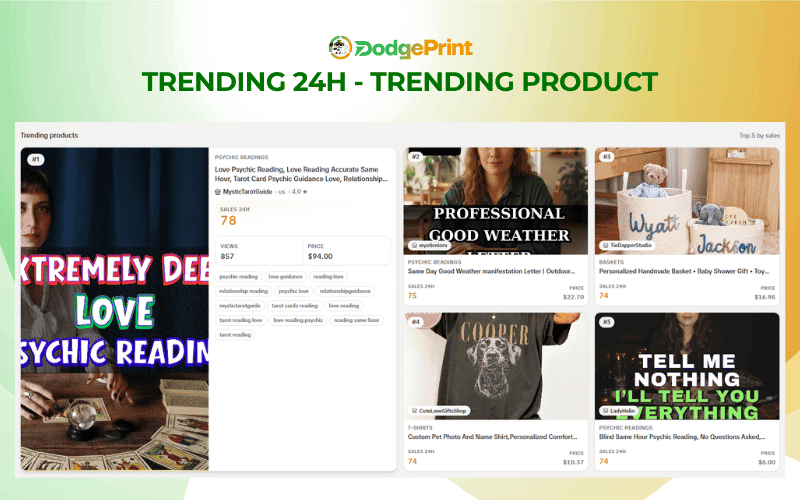
Trending products displays the Top 5 products by sales, along with images, shop names, prices, and Sales 24H. Expanded information cards also include views and tags.
From here, sellers can examine how a product is presented through its design, mockups, and listing content. These details provide a starting point for deeper research and choosing an approach that fits their shop.
Competition Tracker: Save shops and listings to track Etsy competitors
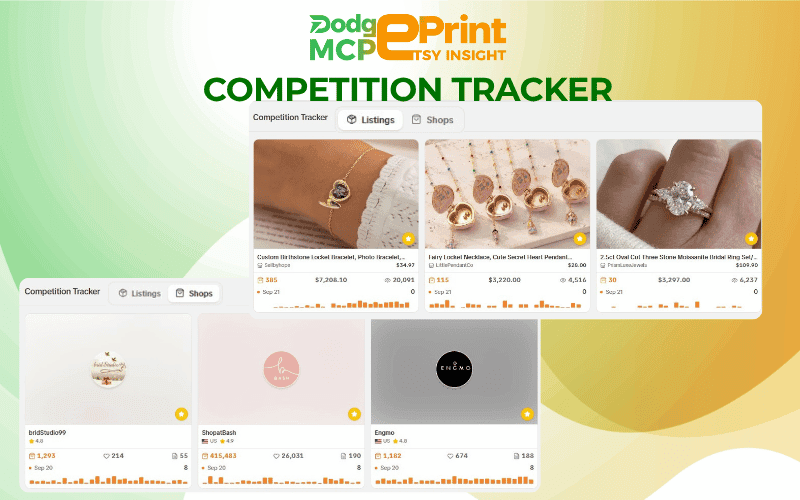
During research, you may come across a shop in the same segment or a listing you want to explore in more detail. Competition Tracker lets you save these shops and listings while browsing Etsy, then brings them together in a dedicated tracking list in the App.
Manage your Listings and Shops lists
The list is divided into two tabs:
- Listings: displays saved products, including images, titles, shop names, prices, metrics, and bar charts. Sellers can search by listing title.
- Shops: displays saved shops, including shop names, countries, ratings, overview metrics, and bar charts.
Each saved shop or listing has its own information card for easy reference. You can save both shops you want to track over the long term and listings relevant to a specific product plan.
Continue researching from your saved list
For example, when researching personalized gifts, sellers can save several shops in the same segment and listings worth referencing. In your next session, you can return to the list to review data and continue your analysis without going back to the extension or Etsy Insight to search for them again.
Bringing competitor shop information together in one place reduces the effort of searching again. It also makes competitor tracking more focused and helps you spot even the smallest changes from competitors.
Extract designs and create mockups on the Etsy Insight Extension
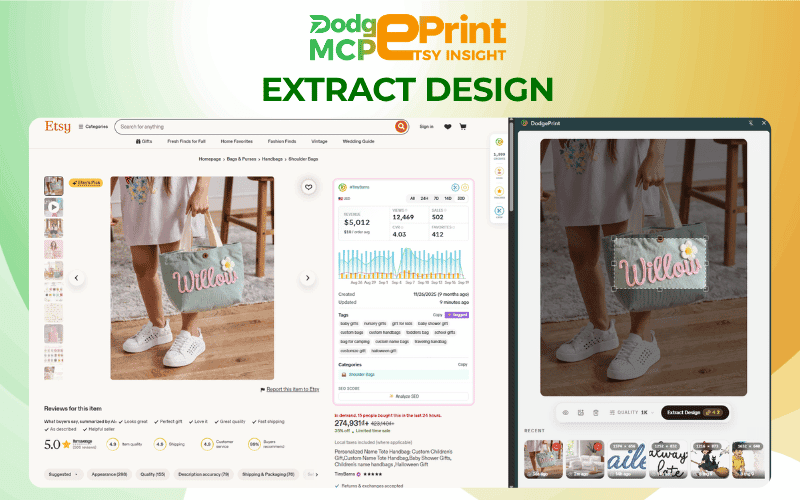
Alongside research and competitor tracking, the Etsy Insight Extension adds the ability to remove backgrounds from designs in listing images, create mockups, and continue listing across multiple shops directly from the Etsy interface.
These actions flow together as sellers work with products, making the transition from research to image preparation more convenient.
Extract designs from listing images
Sellers can separate a design from its image background for use in mockup creation. One use case is recovering a design from a listing image in your own shop to prepare a new set of product images.
After extraction, check the text, lines, and small details. Once the design is ready, you can continue creating mockups directly on the Extension.
Create mockups and prepare listings for multiple shops
Using the processed design, sellers can create mockups to show the design on a product, then continue the workflow for listing across multiple shops.
Before publishing, review the design placement, proportions, and how accurately the mockup represents the actual product. For each shop, images and listing content should also be tailored to the target audience.
The convenience lies in being able to continue processing images while working on Etsy, reducing the need to switch between separate preparation steps.
Combine the three features to research and develop products
With the DodgePrint Etsy Insight update, sellers can easily organize their work in the following sequence:
- Find a research direction: explore keywords and products with high sales in Trending 24H.
- Evaluate further: compare competition levels, opportunity scores, and related listings.
- Save shops and listings to track: add shops and listings of interest to Competition Tracker.
- Prepare products: develop original designs, process images you have the right to use, create mockups, and continue listing across multiple shops.
For example, after choosing a suitable gift theme, you can save related listings to study how the products are presented. Once your design is ready, move on to preparing mockups and listing content according to your plan.
Explore DodgePrint Etsy Insight and try the new features to connect research, competitor tracking, and product preparation during peak season.
Frequently asked questions about the DodgePrint Etsy Insight update
What new features has DodgePrint Etsy Insight introduced?
The three updates include Trending 24H, Competition Tracker, and design extraction and mockup creation on the Extension. These features help sellers view sales data, save competitors to track, and prepare listings for multiple shops.
What information does Trending 24H provide?
Trending 24H displays the Top 15 keywords by sales, competition levels, opportunity scores, related listings, and the Top 5 products by sales. The data covers a 24-hour period, with hourly updates shown in the interface.
Can Competition Tracker save shops or listings?
The feature supports saving both shops and listings. They are organized into two tabs, Shops and Listings, so sellers can easily return to view information, metrics, and charts.
Can I extract designs and create mockups directly on Etsy?
Yes. The Etsy Insight Extension supports removing backgrounds from designs in listing images and creating mockups directly on the Etsy interface, then continuing the workflow for listing across multiple shops.
Should I start researching with Trending 24H or Competition Tracker?
If you need ideas for new products, you can start with Trending 24H. If you already have shops or listings you want to research, save them to Competition Tracker to keep tracking them. The two features can be used sequentially within the same workflow.