As the business continues to grow, owners and leaders no longer need to handle every task directly, but they still need to stay informed about what is happening across the system.
With the DodgePrint Mobile App, managers can easily check key data on performance, shops, and orders, making it easier to stay updated whether they are in meetings, traveling, or on business trips.
With just a few taps, sellers can monitor their business anytime, anywhere without relying entirely on a computer. Learn more in the article below.
Who is the DodgePrint Mobile App for?
The DodgePrint Mobile App is especially suitable for business owners, agencies, managers, and Print on Demand team leaders who manage multiple shops, have busy schedules, and need to stay updated regularly to make timely business decisions.
The app is suitable if you:
- Need to quickly check revenue and orders between meetings.
- Frequently travel or go on business trips but still want to monitor team performance.
- Manage multiple shops across multiple marketplaces and need to know which channels are growing or declining.
- Want to quickly check order status and important alerts directly from your phone.
The Mobile App does not completely replace the web version. Instead, it serves as a complementary tool - a compact management dashboard that helps managers quickly understand what is happening before diving deeper into tasks on desktop.
What’s new in the DodgePrint Mobile App?
The DodgePrint Mobile App still retains the core features that help sellers monitor their business directly from their phones, while adding new sections and interface updates to make quick checks more convenient.
Core management features remain available
Sellers can still use the Mobile App to:
- Track key dashboard metrics such as Revenue, Orders, Ads, and Customers
- View performance by Marketplace, Shop, and Product
- Manage multiple shops across Etsy, Shopify, TikTok Shop, and Amazon
- Track Orders and Fulfillment status directly from their phones
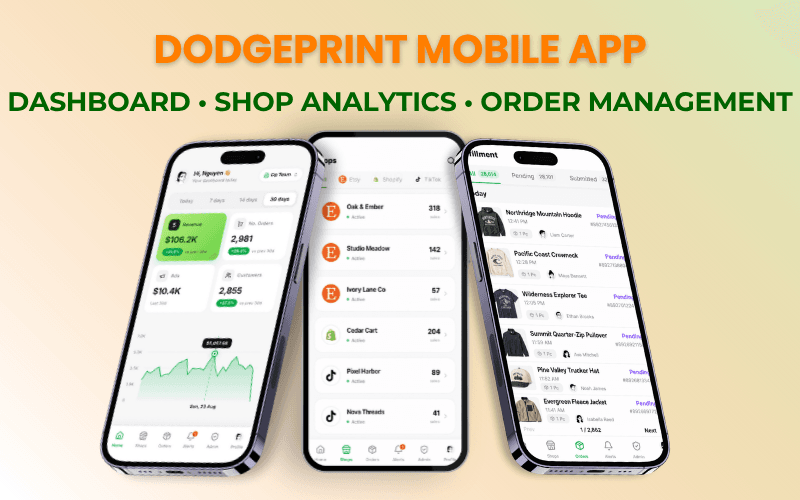
These features were introduced in detail in our previous article. You can learn more here:
DodgePrint Mobile App – Manage Your POD Business Anytime, Anywhere.
A more intuitive Dashboard designed for quick checks
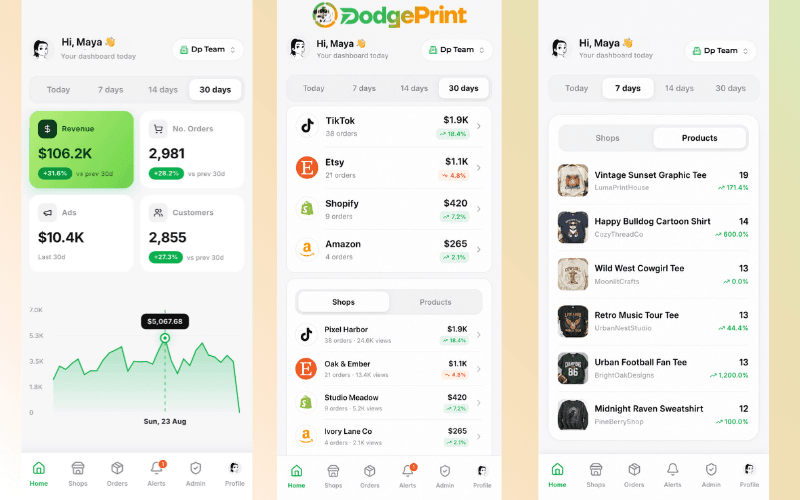
One of the most noticeable changes in the current version is the simpler and more intuitive Dashboard layout.
Right on the Home screen, key metrics are displayed at the top, along with charts and time filters for Today, 7 days, 14 days, and 30 days. Below, data is clearly organized by Marketplace, Shop, and Product.
With just a few quick actions, managers can quickly identify which channels are growing, which shops need attention, or which products are experiencing changes.
Alerts help you keep track of important updates
The new version adds an Alerts section directly to the main navigation bar.
This section helps users easily check important operational updates without opening each shop or individual order. For owners or leaders who are frequently on the move, Alerts make it easier to stay on top of the business directly from mobile.
Profile now includes Workspace and Push Notification settings
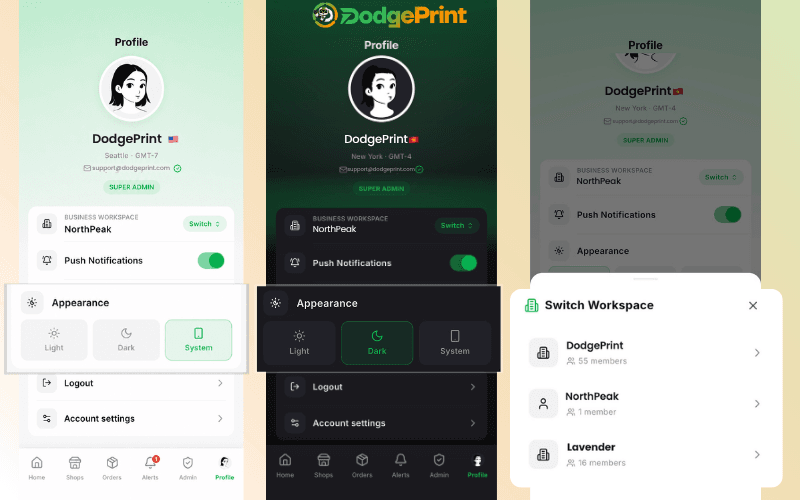
The Profile section has also been expanded with additional management options.
Users can:
- Switch between different Business Workspaces
- Turn Push Notifications on or off to avoid missing important updates
This is especially useful for teams or agencies managing multiple workspaces at the same time.
Supports Light Mode, Dark Mode, and System Mode
Another new update is the ability to customize the interface based on individual usage preferences.
The Mobile App now allows users to choose between:
- Light Mode
- Dark Mode
- System Mode
Users can select the interface that best suits their preferences and usage environment.
DOWNLOAD THE DODGEPRINT MOBILE APP AND TRY IT TODAY
A Mobile App designed to help multichannel Print on Demand managers stay updated faster
The Mobile App is not designed to bring every desktop feature onto your phone. Instead, it focuses on the most essential features for managers, including Dashboard, Shop Analytics, Orders, and Alerts.
For busy managers, these features reduce the number of steps needed to answer practical questions such as: “How is revenue today?”, “Which shop is growing?”, “Are there any orders that need attention?”
As a business grows, being able to quickly understand what is happening can be just as important as handling each task directly. The DodgePrint Mobile App helps managers monitor their business more flexibly from their phones alongside the desktop version. Download the app and try it today!
Frequently Asked Questions
Who is the DodgePrint Mobile App for?
It is suitable for POD sellers, business owners, managers, and team leaders who need to regularly monitor performance, shops, and orders when they are away from their computers.
Does the DodgePrint Mobile App replace the website version?
No. The Mobile App is designed for monitoring and quick checks, while the web version remains better suited for operational tasks and more in-depth analysis.
Which operating systems does the DodgePrint Mobile App support?
The app is currently available for download on iOS and Android.