If you want to receive payments smoothly on Etsy, one of the first and most important steps is learning how to verify bank account on Etsy. Without proper verification, you won’t be able to receive payouts - even if your store is already making sales.
The good news is that the process is actually simple once you understand how it works. In this guide, you’ll learn exactly how to verify bank account on Etsy step by step. You’ll also discover common mistakes to avoid so you can start getting paid faster.
Why Do You Need to Verify Bank Account on Etsy?
Verifying your bank account is essential. This is because it allows Etsy to securely send your earnings and confirm your identity as a seller.
Here’s why it matters:
- Receive payouts: Without verification, Etsy cannot transfer money from your sales to your bank account.
- Ensure account security: Verification helps Etsy confirm that you are the rightful account owner and reduces the risk of fraud.
- Comply with Etsy’s payment system: Etsy requires all sellers using Etsy Payments to complete bank verification before accessing funds.
- Avoid payment delays: Incorrect or unverified bank details can lead to delays or failed payouts.
Valuable read: Do You Need an LLC to Sell on Etsy? 2026 Ultimate Guide 🌟
How to Verify Bank Account on Etsy: A Step-by-Step Guide
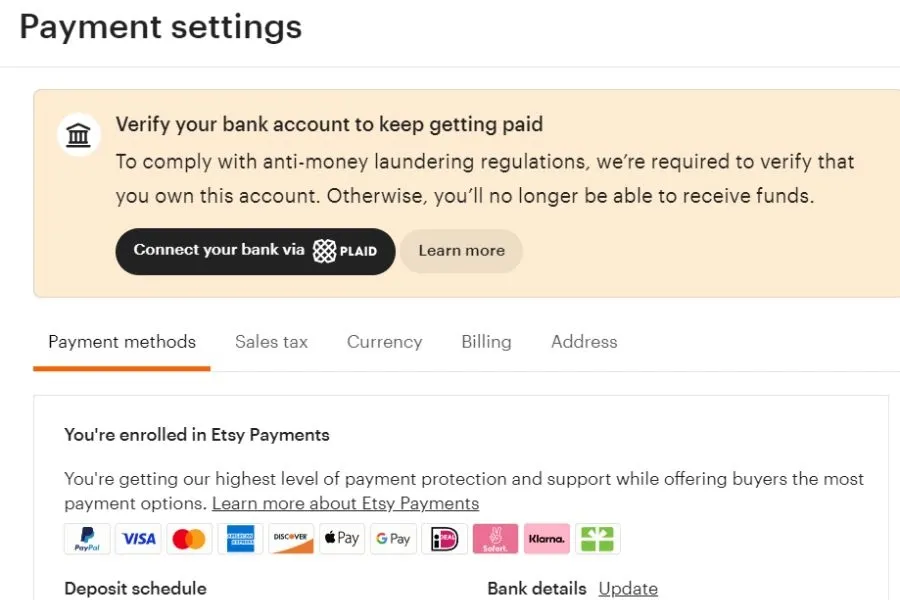
Verifying your bank account on Etsy is a simple process, but it depends on your location. Below is how it works for US sellers.
For US Bank Accounts
US sellers verify their bank accounts on Etsy through Plaid. It is a trusted third-party service used to securely connect your bank and ensure payouts go to the right account.
📌 Where to add or update your bank details:
Go to Shop Manager → Finances → Payment settings
Add your bank account during setup or update it anytime
📌 2 ways to verify your bank account:
1. Instant verification (fastest method)
- Log in to your online banking via Plaid
- Verification is usually instant
- Some smaller banks may take 3–5 business days
- On mobile, you may be asked to confirm via your banking app
2. Manual verification (test deposit method)
- Enter your account + routing number
- Plaid sends a $0.01 deposit with a 3-letter code
- Enter the code back in Etsy (no “#” needed)
- Processing time: 1–5 business days
Use this method if:
- You don’t want to log in via Plaid
- Your bank doesn’t appear in Plaid
- You encounter errors during instant verification
🔔 Important things to know:
You must complete verification within 30 days, or your shop may be suspended
Multiple failed attempts can also lead to account restrictions
After updating your bank account, Etsy may hold funds for 5 days for security reasons
This process helps ensure payouts go to the correct owner and prevents fraud
For Bank Accounts Outside the US
If you’re using a bank account outside the US, the verification process on Etsy works a bit differently. However, it’s still simple once you understand the steps.
📌 When to start verification:
- You can begin after your first sale
- Start within 30 days and complete within 60 days to avoid shop suspension
📌 How verification works:
After adding or updating your bank details in Payment settings, Etsy will require you to verify your bank details before sending payouts.
📌 2 common scenarios:
1. Bank account in the same currency as your Etsy Payment account
- Etsy sends a small test deposit (within 5 business days)
- Check your bank account
- Enter the deposit amount in your Etsy Payment settings to verify
2. Bank account in a different currency
- You may need to upload a bank statement for verification
- Etsy will review it within 5 business days
- Deposits are still sent to your Payment account currency
🔔 Important notes:
Payment partners like Adyen or WorldPay handle test deposits
If you enter the wrong deposit amount multiple times, Etsy may request a bank statement
You can also click “Verify account” in Shop Manager for quick access
Common Bank Verification Issues on Etsy
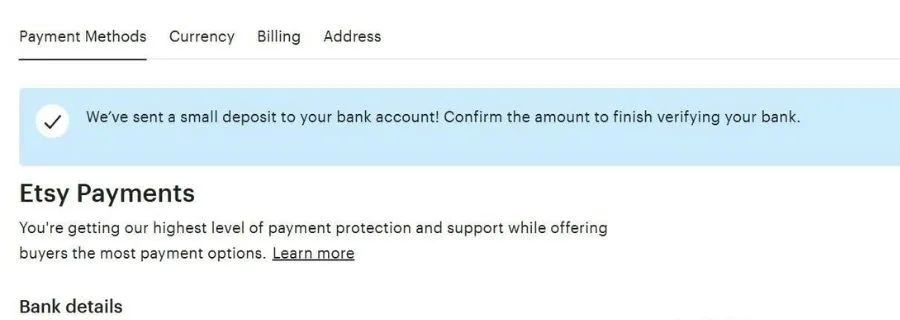
Many Etsy sellers make mistakes when verifying their bank accounts. Here are the most common issues and how to fix them quickly.
What to Do If You Can’t Find Your Bank Account in Plaid?
If your bank doesn’t show up in Plaid, you can still verify manually:
- Choose “Link with account numbers.”
- Enter your routing and account number
- Wait for a $0.01 test deposit with a 3-letter code
- Enter that code back on Etsy to complete verification
👉 Important: Select “Connect via Plaid” when submitting—not “Edit.”
Why Are You Still Suspended After Verifying Your Bank Account?
Your shop may remain suspended if you exceed the maximum number of verification attempts or don’t complete verification within 60 days.
What to do:
- Upload a bank statement for manual review
- Wait about 5 business days
- Complete verification on Etsy.com (desktop), not the app
Etsy Says The Amount You Enter Is Wrong
This usually happens when entering the wrong test deposit amount. You can fix it by:
- Enter the exact amount shown on your bank statement
- Using the latest deposit only (older ones are invalid)
- Waiting up to 5 business days if the deposit hasn’t arrived yet
Always double-check your bank details and wait for the correct deposit before verifying. This helps you avoid unnecessary delays or account issues.
What to Do If You Haven’t Received a Deposit?
If you haven’t received your test deposit yet, don’t worry—this is a common issue and usually easy to fix.
✅First, wait up to 5 business days. Deposits can take time to appear, depending on your bank.
✅If you still don’t see it, go to Payment settings → Edit bank details to request a new test deposit
✅If you are a US seller, you can resend the deposit up to 3 times. If it still doesn’t arrive, contact Etsy Support.
✅If you are an international seller, check your bank statement for deposits labeled: “Etsy,” “Adyen,” “WorldPay,” “Envoy,” or “Etsy Ireland Limited.”
If resending doesn’t work, you can try to do these:
- Upload a bank statement for manual verification
- Go to Payment settings → Upload document
- Submit your details and wait a few business days for review
Missing Deposit Input Field
Sometimes, when verifying your bank account on Etsy, sellers report that they don’t see a place to enter the test deposit amount.
🔶Option 1: Contact Etsy Support
You can reach out to Etsy Support and provide:
- The exact deposit amount
- Your bank details (if requested)
In some cases, Etsy can manually verify your account.
🔶Option 2: Upload a Bank Statement
If the input field doesn’t appear, Etsy may require document verification instead.
- Go to Payment settings
- Update or edit your bank account details
- After 3 attempts, Etsy will prompt you to upload a bank statement
- Submit the document and wait for review
Scale Your Etsy Business Faster with DodgePrint

Once you’ve completed how to verify bank account on Etsy, the next step is growing your store and increasing your sales. That’s where DodgePrint can help you save time and scale efficiently.
Instead of managing everything manually, DodgePrint allows you to:
- Create listings in bulk to launch more products faster
- Generate SEO titles, tags, and descriptions automatically
- Use ready-made mockups or create your own with ease
- Manage multiple Etsy stores and across other platforms (Etsy, TikTok Shop, Shopify, etc.)
- Track performance and analytics to optimize your store
👉 Why it matters:
After setting up your payments, your goal is to increase traffic and conversions. DodgePrint helps you automate repetitive tasks so you can focus on scaling your business instead of doing everything manually.
👉 Ready to grow faster?
Connect your store with DodgePrint & start building a more efficient and profitable Etsy business today! 🚀
A must-read: 7 Pro Tips on Reducing Costs While Scaling POD Print on Demand 💲
Bottom Line
Understanding how to verify a bank account on Etsy is a crucial step in starting to receive payments smoothly. The key is to enter accurate bank details, complete verification on time, and resolve any issues quickly. Once your account is verified, you can focus on growing your store and scaling your Etsy sales.