Selling on Etsy is exciting, but it comes with fees for sure. Luckily, Etsy offers a little-known program called Share & Save.
It lets you earn back 4% of your order value simply by driving customers to your shop through your own links. It’s Etsy’s way to reward sellers who bring their own traffic instead of relying on paid ads.
In this guide, we’ll break down what the Share & Save program is and how it works. You also learn how to save on Etsy fees and keep more of your earnings.
What is Etsy’s Share & Save Program?
Etsy’s Share & Save Program is a simple way for sellers to reduce on Etsy platform fees.
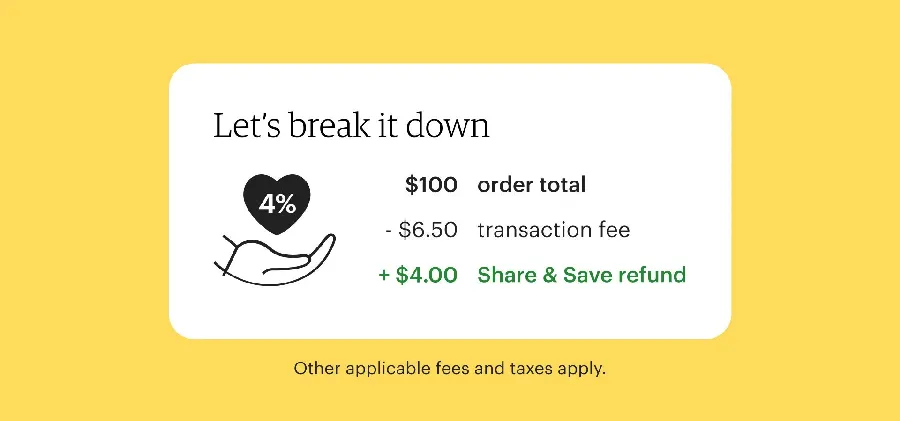
When you share your unique Etsy shop or product link, and a customer makes a purchase through that link, Etsy gives you back 4% of the order total.
Instead of Etsy paying for ads, they give you a small refund for doing the promotion yourself.
You can share your links anywhere - social media, newsletters, or your website.
🔔The best part?
It’s free to join, and there’s no limit to how much you can earn back. The more people buy through your links, the more you save on Etsy fees over time.
How to Set It Up & Track It
⏩Set Up
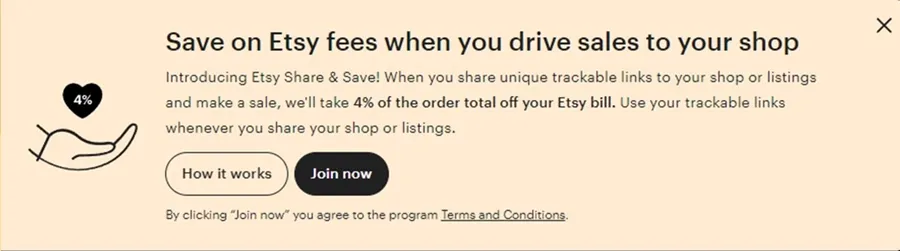
It is super easy to join Etsy’s Share & Save Program:
Go to your Shop Manager → Settings → Share & Save → Join Now
Once you click Join Now, your shop is automatically enrolled. You’ll instantly get access to your own unique shop and listing links.
⏩Track Your Savings
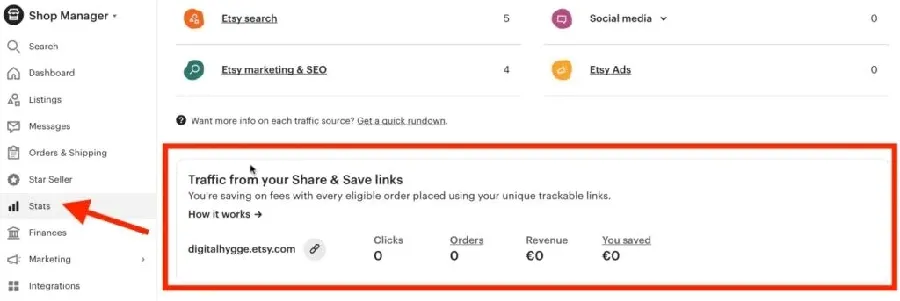
Head to Shop Manager → Stats → Traffic from your Share & Save links
You’ll see a breakdown of the number of clicks, orders, revenues, and how much you earn back.
How to Save on Etsy fees with Share & Save?
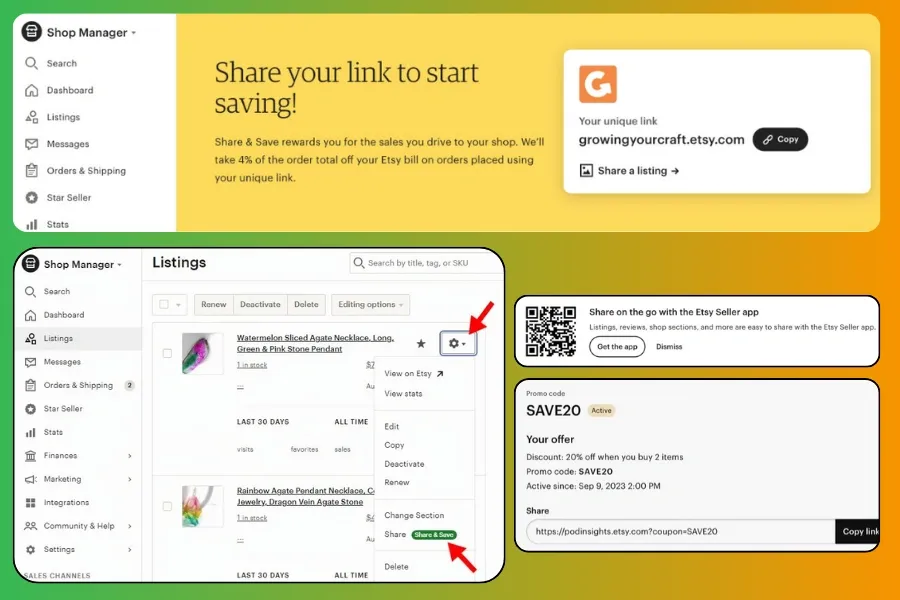
The rule is simple: Share your unique links & get refunds when someone buys through them.
These are kinds of links that you can share:
Trackable Etsy Shop Link
You have to set your Etsy shop link to a trackable link. It looks like this: [your-shop-name].etsy.com
Here's how to set up forwarding for your URL:
- Head to your Custom web address page → Forwards
- Next, input your link in the format "[your-shop-name].etsy.com".
- Then, click Save forward, and you're done.
You can find your new link in the Dashboard or in the Home tab of the Etsy app.
Trackable Etsy Listing Link
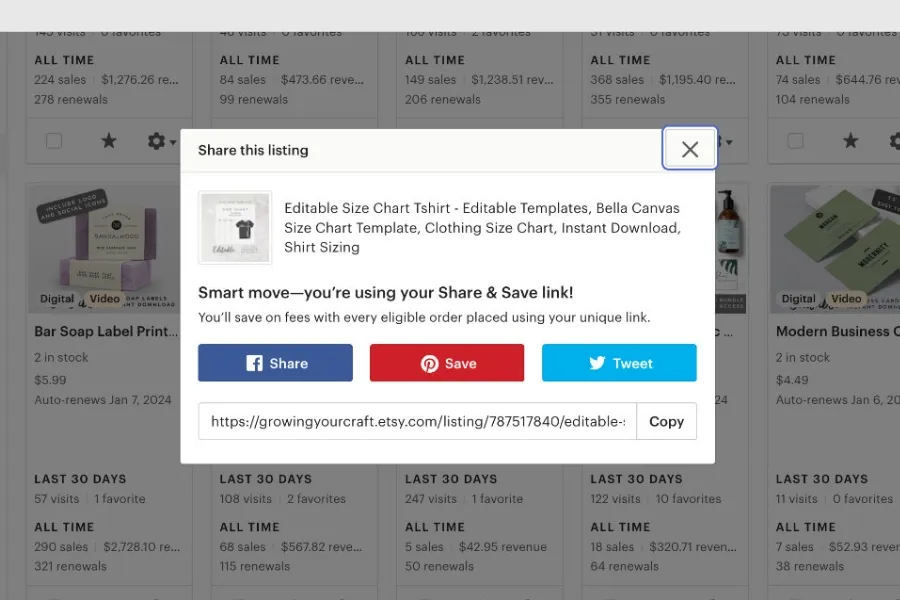
- On the browser: Go to Listings, click the gear icon next to the item, and select Share.
- On the app: Go to Listings, select your item, and tap "Share listing."
Trackable Etsy Promo Codes Link
- On the browser: Go to Marketing → Sales & Discounts, select your promo code, and copy the trackable link.
- On the app: Go to More → Marketing → Sales & Discounts, open your offer under Details, then copy the link.
🔖Keep In Mind:
Buyers must place their order within 30 days after clicking your Share & Save link for it to count.
Your trackable links never expire, so you can keep using them anytime.
Smart Ways to Use Your Share & Save Link
The more places you share them, the more chances you have to earn back Etsy fees.
Here are some smart and creative ways to promote your links effectively:
✅Share on Social Media
Post your shop or product links on platforms like Instagram, Facebook, Pinterest, TikTok, and X (Twitter).
Add them to your bio, pinned posts, or story highlights, and include them in your shop banner or video captions.
✅Share on Your Blog
If you have a blog, don’t miss a chance to share those trackable links on your posts to attract more visitors.
✅Include Links in Your Email Marketing
If you already send newsletters or promotional emails, add your Etsy Share & Save link in them.
Encourage subscribers to shop directly through your link to access new arrivals or special offers.
This helps you stay connected with loyal customers while saving on every order.
💡Expert Tip:
Check out Etsy Email Marketing 101: How to Build & Grow Your List to scale your business
✅Use QR Codes Offline
Turn your Share & Save link into a QR code. Then print it on your business cards, thank-you cards, packaging inserts, or product samples.
This makes it easy for customers to scan and shop directly from their phones.
Common Mistakes When Using Share & Save
Etsy’s Share & Save program is simple to use. However, many sellers still lose potential refunds because of small mistakes.
Below are the most common ones and how to avoid them:
📌Forgot To Sign Up Before Sharing Your Link
Your shop must be enrolled in the Share & Save before you post or send your link. If you share it first and sign up later, those visits won’t count toward your refund.
📌Using a Custom URL
You need to forward your custom Etsy URL to [your-shop-name].etsy.com format. If not, they won't qualify to be credited to Shave & Save.
📌Share Links Inside Etsy
Do not place your Share & Save link inside Etsy (such as in messages, product descriptions, or listing details). These won’t qualify for the fee refund.
Always share your link outside of Etsy, such as on social media, emails, or your personal website.
Benefits for Your Bottom Line
With Share & Save, you get 4% back on every eligible order. This helps cut down your overall Etsy transaction fees.
Moreover, you gain more control over your ad costs and rely less on Offsite Ads when driving traffic from outside Etsy.
🎯Expert Tip:
You'll get more when combining Share & Save with DodgePrint. You can manage all products across different sales channels and fulfill your orders automatically ⇨ More orders - More refunds.
Start using DodgePrint for free today!
This not only improves efficiency but also helps you build a stronger, more professional brand over time.
⭐Highlight:
Get inspired by Sarah Miller’s successful POD business on Etsy!
FAQs About How to Save on Etsy Fees
How Can I Turn Off Etsy’s Share & Save & Rejoin Later?
To opt out:
- Go to Shop Manager → Marketing → Share & Save.
- Scroll to “How can I opt out of Share & Save?”
- Select Opt out.
You can rejoin anytime. Your unique link will still work, but orders won’t earn Share & Save refunds after you leave the program.
When Will I Receive 4% Refund Back?
You’ll get your 4% refund instantly when an order comes from your Share & Save link. It’ll appear in your Payment account under “Share & Save refund.”
You can also track how much you’ve saved in total right inside your Payment account.
How Do I Know If My Order is Eligible or Not?
Just look for the Share & Save badge on your Orders page.
For more details about each order, check your Payment account — it’ll show which sales earned you the 4% refund.
Final Words
With the Share & Save program, every click you share can turn into real savings. This is a secret tip on how to save on Etsy fees that not everyone knows.
Combine it with smart automation of DodgePrint to streamline your workflow, reduce manual tasks, and retain more profit from every sale.