Many Etsy sellers deactivate listings when sales slow and then reactivate them later, hoping for better results. But does this actually help your shop grow?
The truth is, deactivating and reactivating Etsy listings can impact your visibility, ranking, and overall performance if not used correctly.
In this guide, you’ll learn what really happens when you deactivate or reactivate a listing and some practical tips to optimize your store.
Many sellers want to know: Do You Need an LLC to Sell on Etsy? 2026 Ultimate Guide 🔖
What Does Deactivating and Reactivating Etsy Listings Mean?
Before using this strategy, it’s important to understand what actually happens when you deactivate or reactivate a listing on Etsy.
🌿Deactivating a Listing
When you deactivate a listing, it is removed from Etsy search results and no longer visible to buyers. This means customers cannot view or purchase the product until it is reactivated.
🌿Reactivating a Listing
When you reactivate a listing, it becomes active again and can start appearing in search results.
⚠️Important Note
Reactivating a listing is not the same as creating a new one. Your listing’s previous data, such as views, favorites, and sales history, is still preserved. However, its performance and visibility may not return immediately.
Are you a new seller on Etsy? Check out these articles:
Deactivating Etsy Listings

Deactivating a listing might seem like a quick way to “reset” your shop or fix underperforming products. However, on Etsy, this action can directly impact your visibility.
So, before you deactivate any listing, you need to understand how it affects your SEO and when it actually makes sense to do so.
Does Deactivating Listings Affect Etsy SEO?
👉 Short answer: Yes, deactivating listings can affect Etsy SEO.
When you deactivate a listing, it is completely removed from search results. This means it stops getting views, clicks, favorites, and sales.
All of these signals are important for Etsy’s ranking algorithm. Once a listing is inactive, it loses momentum and stops building engagement.
When you reactivate it, the listing doesn’t start from zero, but it also doesn’t instantly regain its previous position. In many cases, you’ll need time to rebuild visibility and performance.
👉 Key impacts:
- Loss of ranking momentum
- Drop in search visibility
- Slower recovery after reactivation
When Should You Deactivate Listings?
Deactivating a listing should be a strategic decision, not a quick reaction to low sales. In most cases, it’s better to optimize your listing rather than remove it.
🔖You should consider deactivating a listing when:
- The product is out of stock and cannot be fulfilled
- The item has quality or supplier issues
- It’s a seasonal product that is no longer relevant
- You plan to stop selling the item permanently
🔖You should avoid deactivating when:
- The listing is not getting sales yet
- You haven’t optimized keywords, images, or pricing
In these cases, improving your listing is usually a better solution than removing it.
Valuable read: 5 Listing Optimization Mistakes on Etsy: What Top Sellers Avoid
How to Deactivate Listings on Etsy
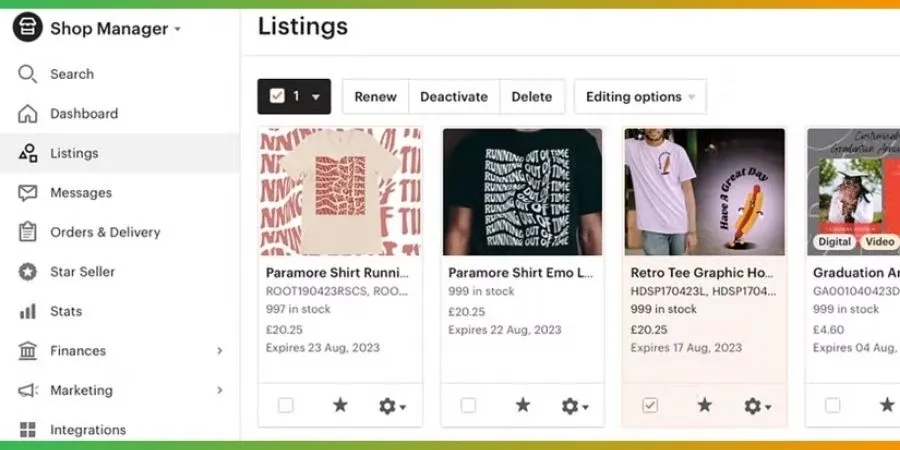
Deactivating a listing on Etsy is simple and only takes a few steps:
- Go to Etsy.com
- Click on Shop Manager
- Select Listings
- Tick the checkbox next to the listing(s) you want to deactivate
- Click Deactivate at the top of the page
Once deactivated, your listing will be hidden from search and cannot be purchased.
➡️ If you no longer plan to sell the product at all, you may want to delete the listing permanently instead of keeping it inactive.
Will Etsy Deactivate A Listing?
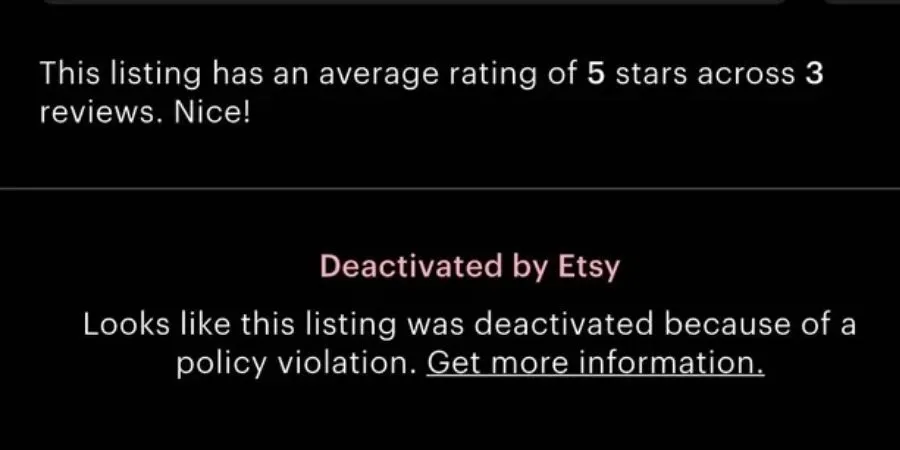
Etsy may deactivate your listings at times. When this happens, you’ll usually receive an email with a general reason, since bots handle many actions.
Common reasons for deactivation:
- Copyright or trademark issues (DMCA claims)
- Selling restricted or unsafe products
- Policy violations (e.g., non-handmade items, inappropriate content)
- Using brand names without permission
- Payment or account issues
- Occasional bot errors during system updates
What Should You Do Next?
If your listing gets deactivated, don’t panic! You can follow these simple steps:
- Understand the reason: Check the email from Etsy and review their policies to identify possible violations.
- Fix the listing: Update or remove anything that may break the rules (keywords, images, product details).
- Contact Etsy support (if needed): If the reason is unclear, reach out for clarification.
- Submit an appeal: After fixing the issue, request a review to reactivate your listing.
👉 Important:
Never relist a removed product without fixing the original issue. Repeated violations can lead to permanent Etsy account suspension.
Better Alternatives to Deactivating Listings

Instead of deactivating a listing on Etsy, there are smarter ways to improve performance without losing your SEO momentum.
1. Optimize your SEO
Update your title, tags, and description with better keywords to improve visibility.
→ With DodgePrint, you can generate SEO-optimized titles, tags, and descriptions automatically, saving time and improving ranking.
2. Improve your images
Better product photos and mockups can increase clicks and conversions.
→ Use DodgePrint’s mockup generator to quickly create professional-looking product images without the added effort of design work.
Learn How to Create Mockups for Print-on-Demand Products here. 🌟
3. Adjust pricing
Test different price points or promotions to find what converts best.
→ DodgePrint’s analytics dashboard helps you track performance and identify which products are underperforming.
4. Update or refresh your listing
Instead of deactivating, edit your listing or make small updates to keep it relevant.
→ With DodgePrint, you can bulk edit listings across your store in just a few clicks.
5. Add variations or personalization
Offering more options can attract more buyers and increase conversion rates.
→ DodgePrint makes it easy to create and manage multiple product variations at scale.
💡Final tip:
Deactivating listings should be your last option. With tools like DodgePrint, you can handle everything from SEO optimization, bulk listings, mockups, analytics, and order management. All can be processed in one place.
It just takes less than 2 minutes to connect your Etsy stores with DodgePrint. Moreover, you don’t need to pay any extra cost. ➪ So, sign in to DodgePrint right now!
Redeactivating Etsy Listings
Reactivating a listing on Etsy is a simple process. But do you know what actually happens after you turn it back on? Many sellers expect instant results—but in reality, performance may take time to recover.
What Happens When You Reactivate a Listing?
When you reactivate a listing, it becomes visible and available for purchase again. However, it doesn’t behave like a brand-new listing.
Here’s what to expect:
- Your previous data (views, favorites, sales) is still preserved
- The listing can reappear in search results
- But it may not rank as well immediately
Since the listing was inactive, it likely lost momentum. This means you may need to:
- Rebuild engagement
- Improve SEO
- Optimize images or pricing
How to Redeactivate Listings on Etsy
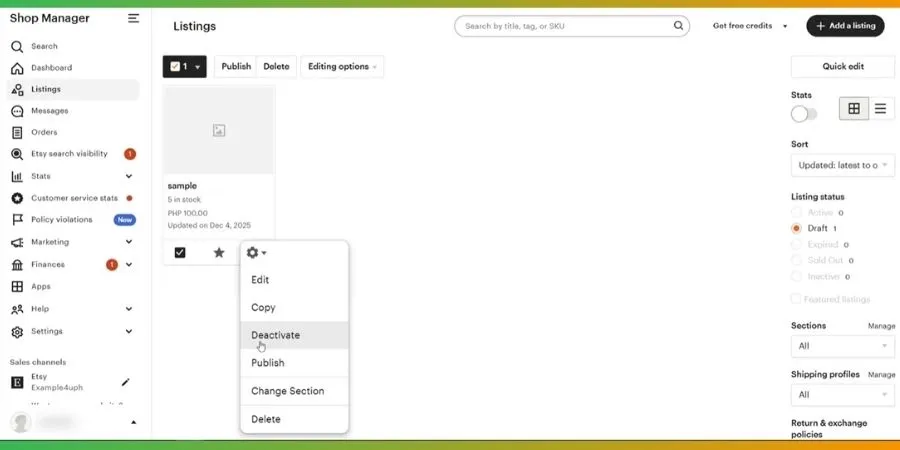
Reactivating a listing is quick and easy. You just need to follow some simple steps as below:
- Go to Etsy.com
- Click on Shop Manager
- Select Listings
- Under “Listing status,” choose Inactive
- Tick the box next to the listing(s) you want to reactivate
- Click Activate at the top of the page
⭐ Important notes:
- If your listing is still within its 4-month period → you can reactivate it for free
- If it has expired → you’ll need to renew it for $0.20 before reactivating
FAQs - Deactivating and Reactivating Etsy Listings
Does Reactivating Etsy Listings Boost Ranking?
No, reactivating a listing does not automatically boost its ranking. While your listing becomes visible again on Etsy, it doesn’t receive the same “freshness boost” as a newly created or renewed listing.
To improve ranking, you’ll still need to optimize your SEO, images, and conversion rate.
How Long To Regain Ranking After Reactivating Etsy Listings?
There’s no fixed timeline. It depends on factors like your keywords, competition, and how well your listing performs after reactivation. Some listings may recover within a few days, while others can take weeks.
How Often Should I Renew Listings on Etsy?
You should renew listings strategically, not randomly. Renewing can give a small visibility boost, so it’s best used for:
- Listings that are already getting some traffic
- Seasonal or trending products
- High-potential items you want to push
Avoid over-renewing low-performing listings without optimizing them first. This may waste your time and budget without improving results.
Final Thoughts
Understanding deactivating and reactivating Etsy listings is crucial if you want to manage your shop effectively on Etsy. Deactivation should only be used when truly necessary, such as out-of-stock or seasonal items.
In this way, you can maintain your listing performance and grow your store more sustainably over time.