On May 11, 2026, Etsy officially rolled out the biggest update ever made to its Personalization feature. Right after the official announcement, DodgePrint quickly deployed and completed the integration of this new feature on our app, ensuring that sellers managing personalized listings can continue operating without any disruption.
In this article, DodgePrint will walk sellers through the details of Etsy's latest Personalization update and show how to use the new feature directly within DodgePrint to run your shop more efficiently.
Detailed Look at Etsy's Latest Personalization Update
With this update, Etsy now allows sellers to create up to 5 different question fields within a single listing. This is a foundational feature that sellers of personalized products have been waiting for over the years.
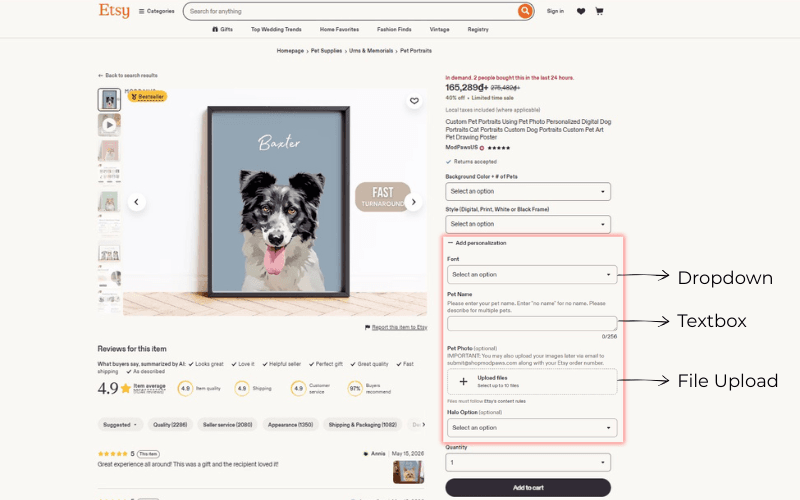
Beyond the familiar Text Input, the biggest change in this update is the introduction of two completely new question types: Dropdown (List of Options) and File Upload. At the same time, sellers can now toggle each field as required or optional before checkout. Below is a detailed breakdown of the three question types that sellers can use in this updated release.
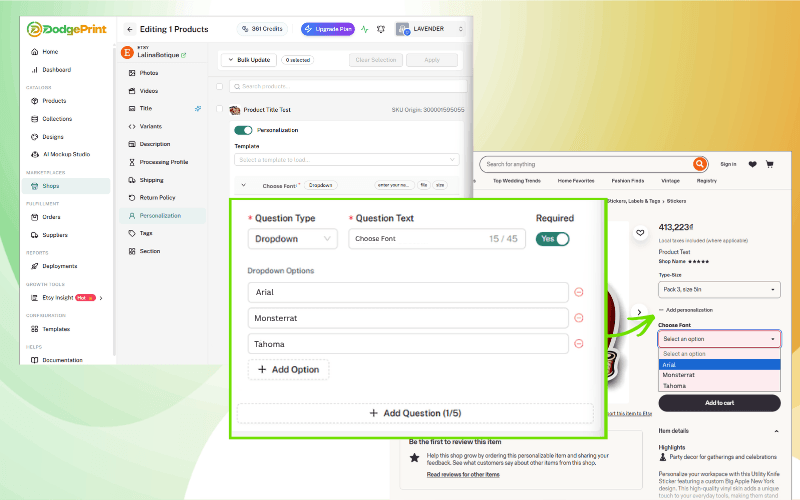
Dropdown (List of Options)
The Dropdown feature lets sellers create a list of preset options for buyers to choose from. Instead of asking buyers to type their selections, sellers can offer fixed choices such as font style, color, text style (italic, bold, etc.), or any other information that has a defined set of options.
This feature virtually eliminates buyer input errors, standardizes data for fulfillment, and significantly cuts down order processing time for Etsy sellers.
File Upload
Next comes File Upload - arguably the most anticipated feature in this update. With File Upload, buyers can upload images or files directly at checkout, with support for up to 10 files per upload, 100MB per file, and common formats such as .jpg, .png, .svg, .heic, and .pdf.
This feature enables sellers to start production immediately after receiving an order, drastically reducing the wait time for buyers to send images through chat, a common bottleneck in fulfillment. It's especially useful for shops selling products such as pet portraits, photo lockets, and other custom-made items that require buyer-supplied images.
Text input (Textbox)
Previously, sellers had only one single text field to collect all personalization details from buyers, a setup that often led to missing information, mistakes, and constant back and forth messaging.
Now, sellers can create multiple text boxes within a single listing to collect each piece of information separately, such as names, dates, or short personalized messages. In addition, sellers no longer need to message buyers individually to explain where the text will appear on the custom product - they can do so directly through the Title and instruction box.
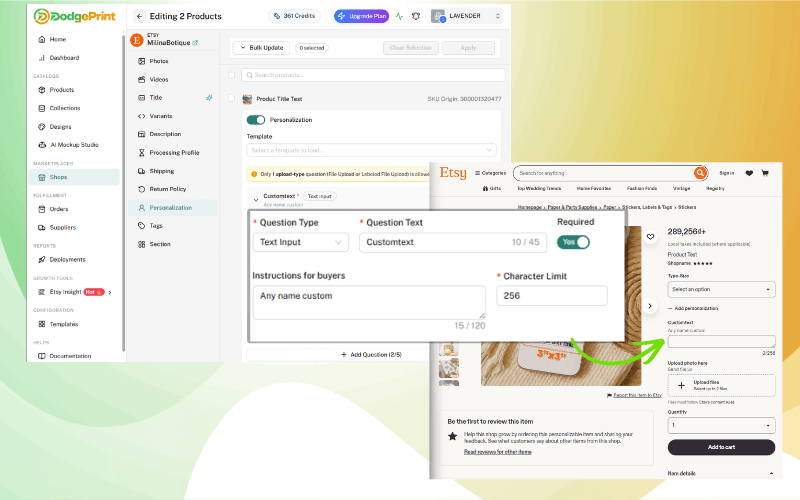
The Title is limited to 45 characters and the instruction text is limited to 120 characters (down from 256 previously). This character limit ensures that descriptions stay concise, easy for buyers to understand, and well-optimized for mobile displays.
Before vs. After: What Etsy's Update Means for Sellers
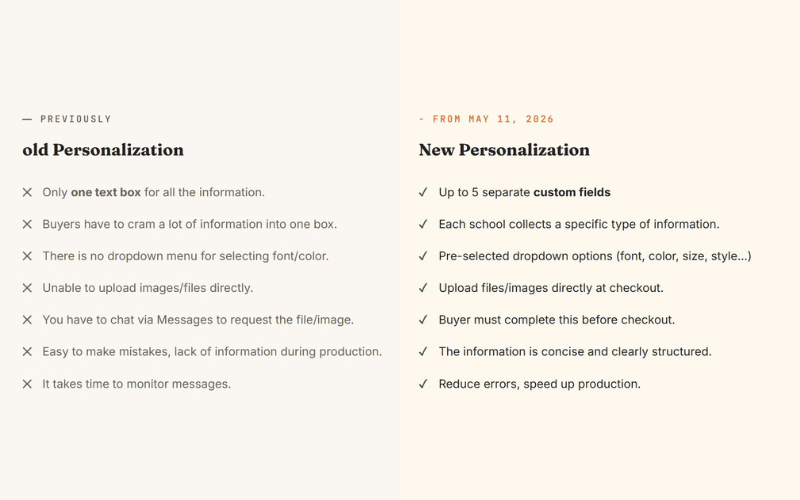
Overall, this update helps personalization sellers reduce errors, speed up fulfillment, improve buyer experience, and scale more easily as order volumes grow - paving the way for more 5-star reviews thanks to products being made right the first time.
The Personalization Feature Has Been Updated on the DodgePrint App
Right after Etsy released its update, the DodgePrint engineering team worked around the clock to make sure sellers wouldn't face any operational disruption. Just a few hours after receiving the update notice from Etsy, the feature went live on the DodgePrint app and was fully synced shortly after.
This rapid rollout reflects DodgePrint's ongoing commitment to its sellers past, current, and future: every Etsy change is reflected on our platform as quickly as possible, allowing sellers to manage and operate everything comprehensively from a single dashboard.
4 Personalization Question Types on DodgePrint
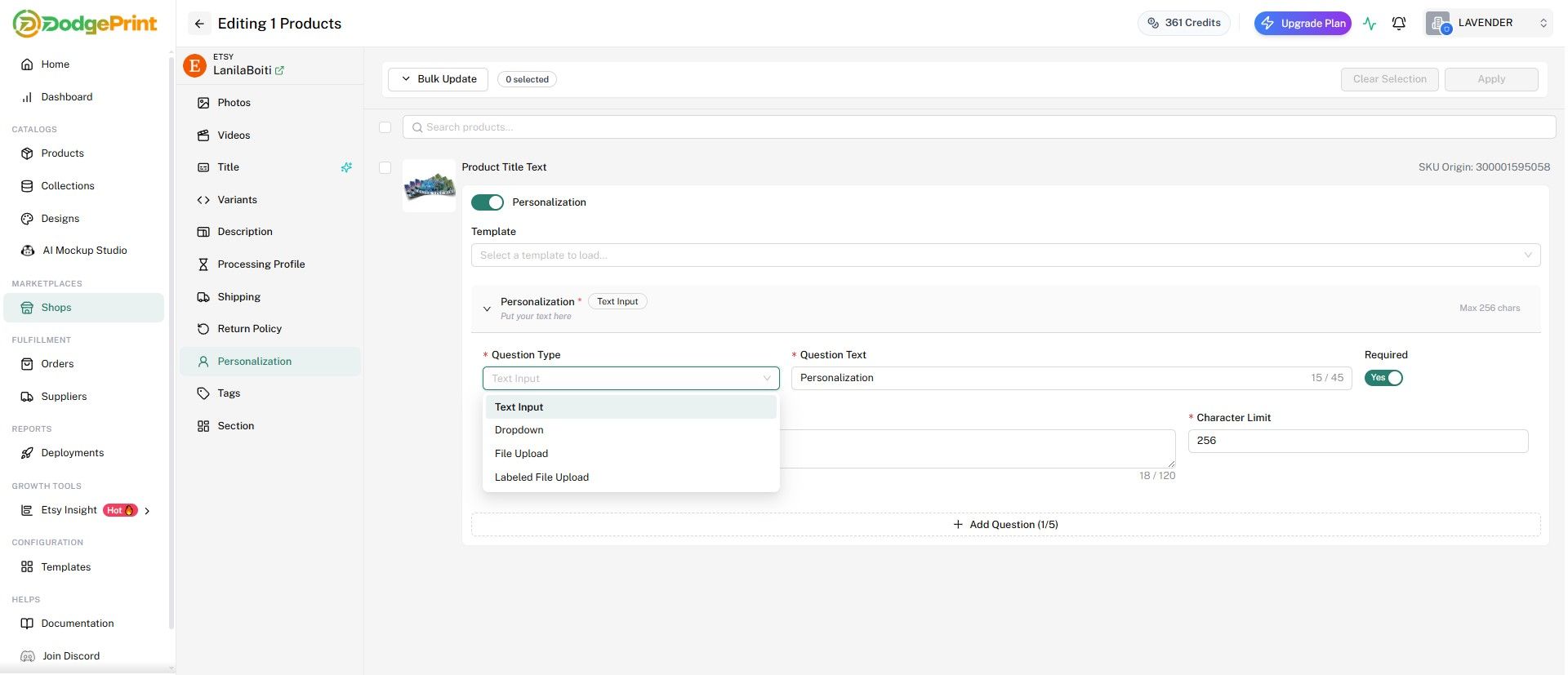
DodgePrint fully supports the 3 question types offered by Etsy, plus an additional Labeled File Upload option that lets sellers request multiple files with clear labels (for example, "Front side photo" or "Back side photo"):
- Text Input - Free text field, up to 256 characters
- Dropdown - Create a preset list of options
- File Upload - Enable a direct file/image upload box
- Labeled File Upload - Upload files with labels for specific positions
Each listing supports up to 5 questions (with a visible counter such as "Add Question 2/5" on the interface) and 1 upload-type field, in line with Etsy's limits. Sellers can toggle Required on each individual field to ensure no critical information is missed.
Template Listing: A Powerful Personalization Tool on DodgePrint
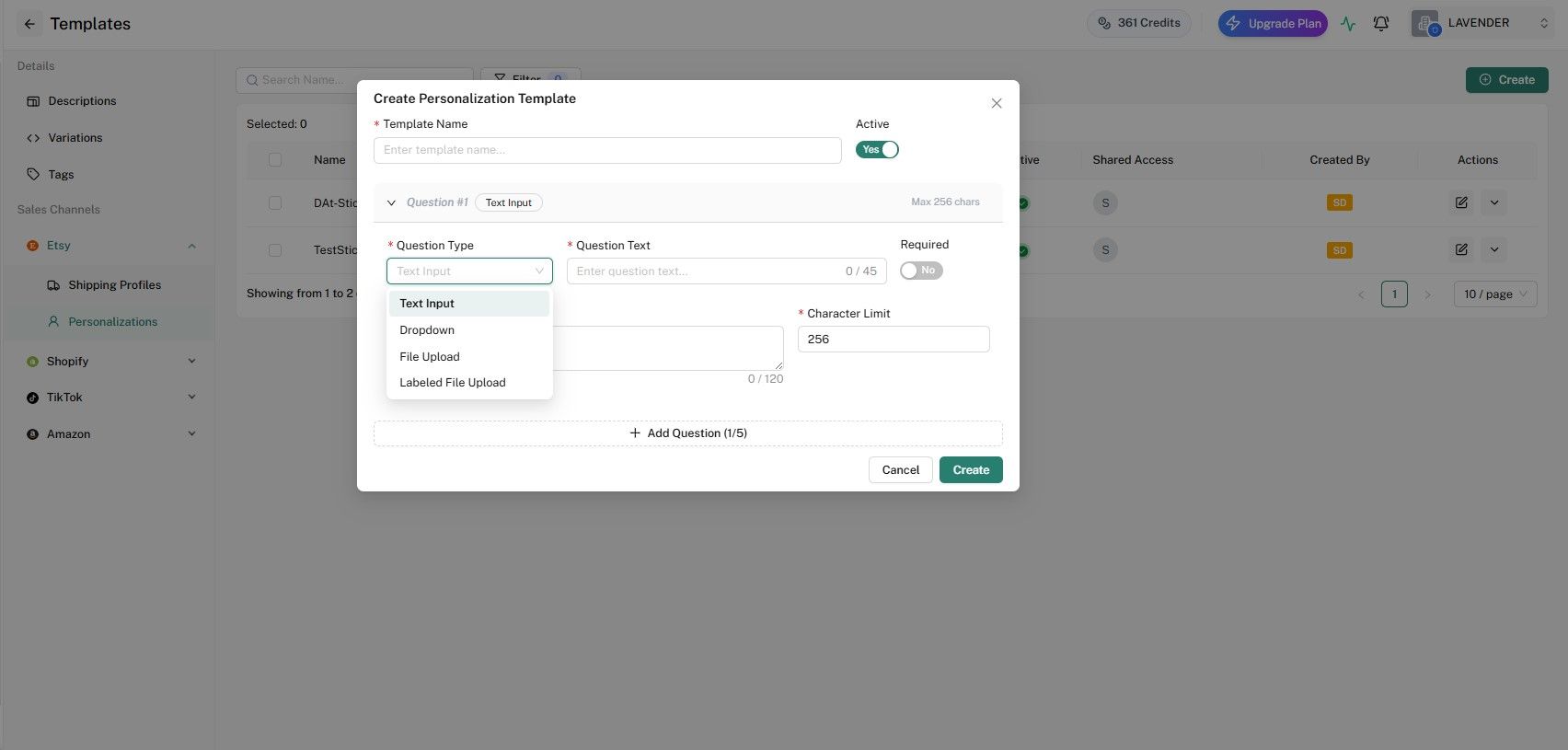
Beyond fully supporting Etsy's native features, DodgePrint also offers Template Listing - a feature that lets sellers create ready-made Personalization setups and apply them across multiple similar listings at once.
This is a major advantage for sellers managing large catalogs of customized listings that need updating: instead of editing each listing manually, sellers can create a template once and bulk edit all relevant listings on DodgePrint in a single action.
Once edited and published, all updates are synced directly to the corresponding Etsy listings no need to repeat the work on Etsy.com.
Frequently Asked Questions About Personalization on DodgePrint
How to Use This Feature on the DodgePrint App
To configure Personalization for a custom listing, sellers can follow these 4 simple steps:
Step 1: Log in to DodgePrint and go to the Shop you want to edit on Etsy.
Step 2: Select the custom listing you want to apply Personalization to.
Step 3: Click Edit listing, then navigate to the Personalize tab.
Step 4: Turn on the Personalization toggle, then choose a Question Type and fill in the content for each field. You can add up to 5 questions, set character limits, define maximum file uploads, and set the Required status for each field.
If you don't have an account yet, you can sign up for a free trial at app.dodgeprint.com/register, or contact us at [email protected] for personalized advice on the right trial plan for your shop size.
How Many Personalization Options Does DodgePrint Support for Etsy Products?
DodgePrint currently supports 4 options: Text Input, Dropdown, File Upload, and an additional Labeled File Upload - an extended version of File Upload available exclusively on DodgePrint.
Final Thoughts
Etsy's latest update is a major step forward for the community of sellers running personalized product businesses. With 5 information fields and 3 new question types (Text Box, Dropdown, File Upload), sellers can collect buyer information far more easily, reduce errors, and speed up fulfillment.
More importantly, DodgePrint's fast and timely rollout of this new feature, in lockstep with Etsy demonstrates our ability to adapt quickly to marketplace changes. That adaptability is one of the most critical qualities for POD sellers managing multiple shops across multiple platforms.
Sign up for free to experience the all-in-one operating system for Print on Demand at: app.dodgeprint.com/register.